

XMLQuire's XPath Editor has auto-complete, tracing, syntax-coloring, dynamic-evaluation features at its core.
Blended with a fully-featured XML Editor, a compelling new XPath test and development environment is now offered, building on our orginal SketchPath tool legacy.
XMLQuire is a free 3MB .exe download with no registration
Opening the XPath Editor
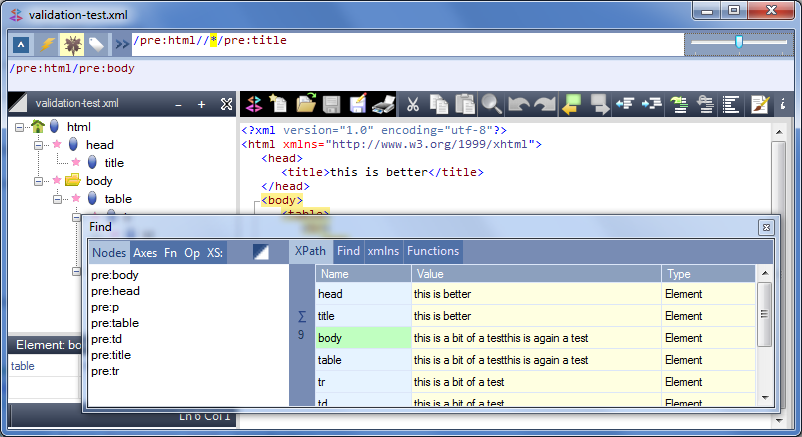
The XPath-Location bar, at the very top of the XMLQuire window, is the only visible part of the editor when XMLQuire opens. Double-Click on this for the full XPath Editor view. Alternatively, select the XPath tab on the Find dialog.
Features
Full details are in theXMLQuire documentation, but here are just some of XMLQuire's XPath Features:
.NET Framework XPath 1.0 processor*
XPath-Generation from text and node panes
Auto-Completion - with full predicate/fn context
Syntax Coloring
Expression Tracing for predicates/functions/nodes
Dynamic Evaluation - results as you type
XPath Help - Context-aware function help
Evaluation Context - Namespaces and Context Node
Results synchronised across outline and text views
Screenshot of XMLQuire's XPath Editor
*On XPath 2.0
XMLQuire itself no longer supports XPath 2.0 due to redistribution costs. Instead, I've launched a separate web-based XPath 2.0 editor, Pathenq.
If you're fortunate to be able to use XPath 2.0 in your solutions, then this is the way to go - so please try out this new tool. It's already fully functional, but this is at an early stage (as of Oct 2012) so new features added at a steady rate.